
The Researcher to Reader Conference Call for Papers is using the Ex Ordo proposal management platform. This is very easy to use, but some guidance on how to use the platform, and what to enter, is given here. Please contact us if you are having any difficulties.
IMPORTANT:
As you go through each stage of the proposal process, the information on that page is automatically saved when you click the Done : Go To The Next Step button. If you close the Ex Ordo tab when the next screen appears, your input will have been saved, and your proposal status will be ‘Pending’. You can then go back and edit your Pending proposal.
When you get to the Topics page, if you tick the box and then click the Done : Save Submission button, the proposal status will be ‘Submitted’ and we will think that it is complete. If your proposal is still in progress, you can avoid prematurely submitting your proposal by simply closing this tab in your browser – your information will be saved and is editable.

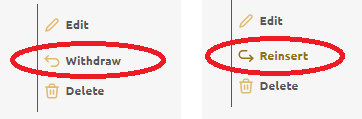
If you did not mean to set it to ‘Submitted’ please change the status to ‘Withdrawn’ and continue editing. You can then click on ‘Reinsert’ to complete the proposal and set the status to ‘Submitted’.
Proposal Entry Guidance
Registration
If you have not used the platform before, you will be asked to register with your name and email address.
Session Format
You will be asked to select the most appropriate format for the session you are proposing.

Title and Abstract
You will be asked to provide a Title, Abstract and Additional Information for your proposal.
The preferred Title format is a short summary Title (about 2-5 words), followed by an explanatory Subtitle (about 5-8 words). For example: “Scholarly Events: An untapped treasure trove of insights & data” or “Open Access in Latin America: The challenge of a sustainable publishing model“.
The Title of a Lightning Talk is normally restricted to 2-6 words in total.
Typically (although not in 2024) the Title:Subtitle combination of an R2R workshop includes a question to be answered by the participants, for example: “Open Access Requirements for Books: How can we support authors with requirements for open access to books?” This helps the workshop developers, facilitators and participants to focus on the tasks to be accomplished and the outcomes expected.
The Abstract should be an audience-facing statement, suitable for publishing in the Conference programme, with a range of 50-100 words. The Abstract of a Lightning Talk is restricted to 40-50 words.
The optional Additional Information section is intended to allow a proposer provide information to help the Advisory Board to evaluate the proposal. This could include an explanation of the importance of the topic, or the qualifications of the proposed contributors. This section is limited to 200 words.

Authors / Contributors
The Author section will ask for brief information on all the contributors being proposed. This could be a single speaker, or a whole panel. A proposer can also include other people associated with the proposal, such as marketing people or project managers who might wish to be connected to the proposal. We also ask that the proposer identifies the role that each author/contributor will have at the Conference, and whether they will be attending at the venue (preferred) or online.

At the end of this page, the proposer can add further authors/contributors.
Topic / Confirmation
We are not using the platform’s Topics functionality, so the proposer can just confirm the proposal is complete. If you tick the box and then click the Done : Save Submission button, the proposal status will be ‘Submitted’ and we will think that it is complete. If your proposal is still in progress, you can avoid prematurely submitting your proposal by simply closing this tab in your browser – your information will be saved and is editable.

Confirmation
The final page is a Confirmation screen, and here the proposer can review their proposal. They can also Edit, Withdraw or Delete the proposal, or start a new proposal. A proposer can go back to the proposal platform at any time to amend their proposal, or to ‘Reinsert’ a ‘Withdrawn’ proposal.

Start now
Start or edit your proposal using the button below:

Page created 9 July 2024 and edited 24 & 25 July and 4, 11 & 12 August 2024
 Researcher to Reader Conference — London — 24-25 February 2026
You must be logged in to post a comment.